Web platform · cloud and self-hosted

FalangFlow

Automation you can see

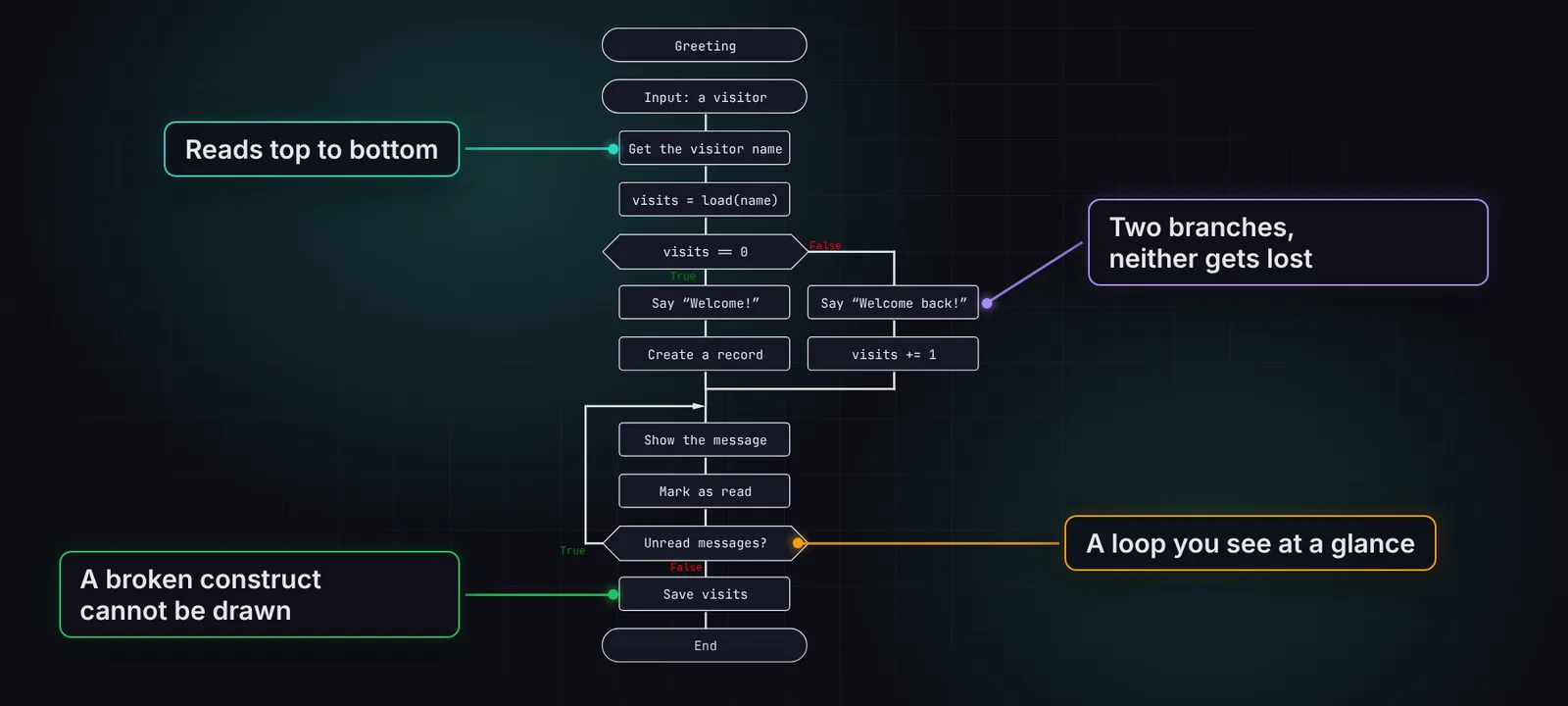
FalangFlow is a visual automation builder: integrations between services, bots and AI scenarios. Every process is a diagram that reads top to bottom and runs as a durable Temporal workflow — with retries, timers and recovery after a crash. Describe the task in words, and the agent builds the process for you.

Try online (soon)Source on GitHub
  • Telegram
  • OpenAI
  • PostgreSQL
  • Webhooks
  • Cron
  • Temporal
  • TypeScript
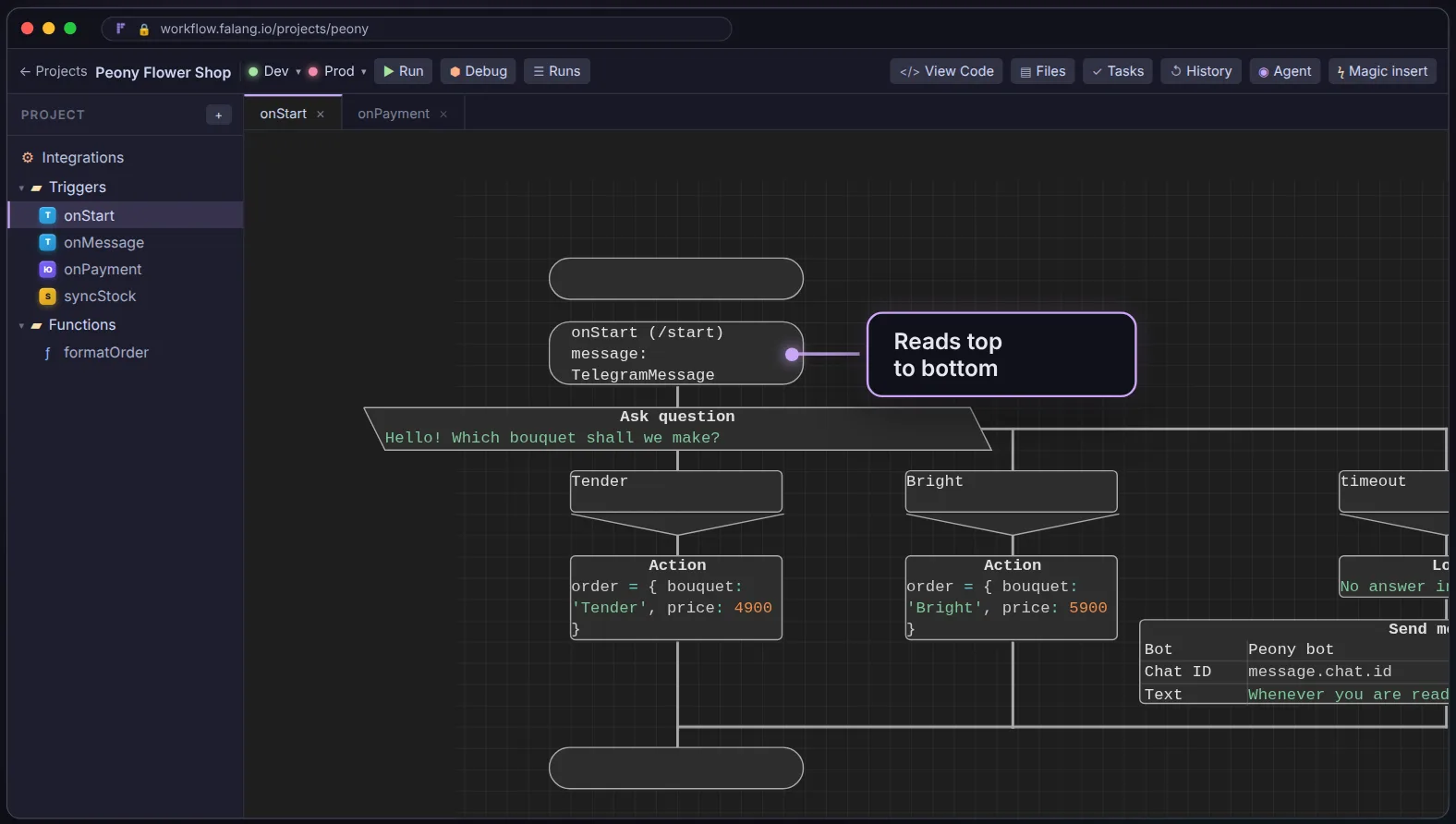
The FalangFlow editor: a flower-shop project, a /start trigger and a Telegram question with buttons

How it works

From event to production

  1. 1

    Pick a trigger

    A Telegram message, a webhook, a schedule, a Bitrix24 event or a confirmed payment.

  2. 2

    Build the diagram

    Yourself, from blocks and integrations — or ask the AI agent in plain language.

  3. 3

    Test on the stand

    Runs with the current step highlighted, breakpoints and variable values.

  4. 4

    Publish

    One click to production — with version history and rollback to any earlier version.

Integrations

22 built-in integrations and 62 more services

From Telegram and OpenAI to databases, payments and the major Russian business services. Every integration has its own encrypted credentials for test and production.

Built in

Messaging and AI

  • Telegram
  • OpenAI
  • GigaChat
  • YandexGPT

CRM and accounting

  • amoCRM
  • Bitrix24
  • 1C (OData)
  • MoySklad
  • Diadoc

Payments and marketplaces

  • YooKassa
  • T-Bank
  • Ozon
  • Wildberries

Data

  • PostgreSQL
  • MySQL
  • SQLite
  • Files

Platform

  • HTTP request
  • Webhook
  • Schedule
  • Media (ffmpeg)
  • Human tasks

+ 62 services via ActivePieces

A catalog of ready-made integrations built on the open ActivePieces library — running in an isolated service, with one-click OAuth2.

  • Slack
  • Discord
  • Microsoft Teams
  • Google Sheets
  • Gmail
  • Google Drive
  • Google Calendar
  • Notion
  • Trello
  • Jira
  • Linear
  • ClickUp
  • HubSpot
  • Salesforce
  • Pipedrive
  • Zendesk
  • Intercom
  • GitHub
  • GitLab
  • Airtable
  • Amazon S3
  • Dropbox
  • MongoDB
  • Shopify
  • WooCommerce
  • Stripe
  • Mailchimp
  • DocuSign
  • WordPress
  • YouTube
  • Zoom
  • Twilio
  • Typeform
  • Calendly
  • and more

FalangFlow

What FalangFlow does

The whole automation lifecycle — from trigger to production — on one platform.

Triggers

Everything starts with an event

A process starts on a bot message or a /start command, an incoming webhook, a schedule, a Bitrix24 event or a confirmed YooKassa payment.

  • Every trigger function gets its own URL
  • Cron with a time zone and a preview of upcoming runs
  • Payments are re-checked against the provider API first
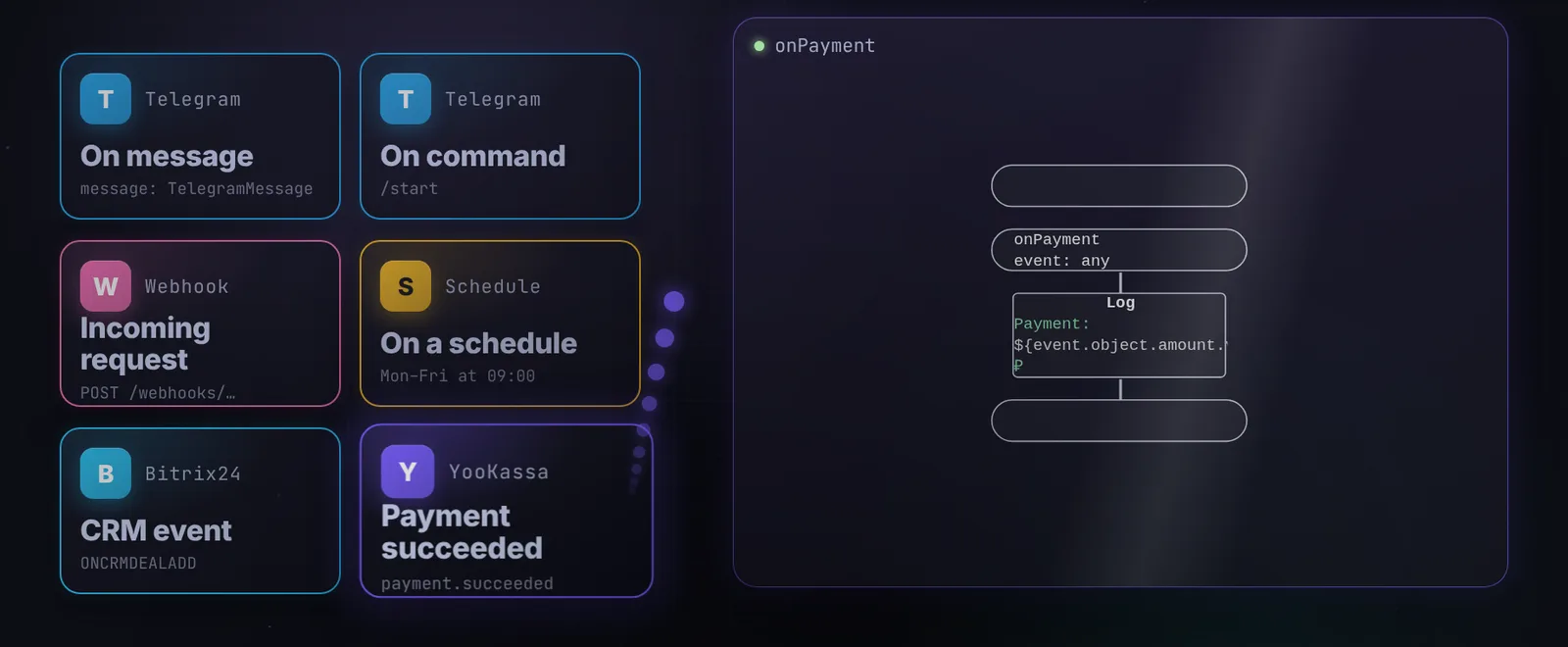
Trigger cards: Telegram message and command, webhook, schedule, CRM event, payment

TypeScript inside

The power of code, where you need it

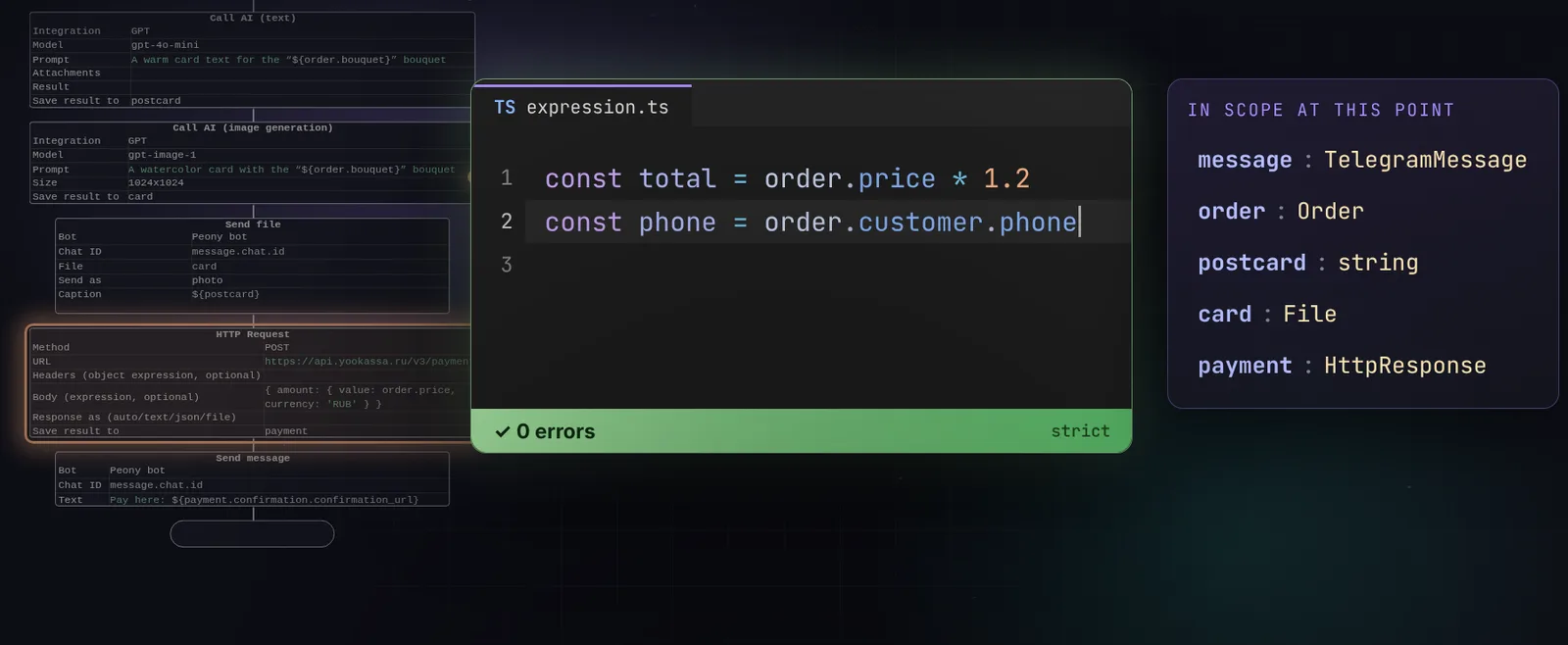
Block fields are real TypeScript with strict type checking. The editor knows every variable at that point in the diagram, suggests fields and underlines typos before anything runs.

  • Autocomplete from integration types and your own structures
  • Database tables become types
  • Errors show up before the run, not in production
A TypeScript expression editor with no errors and the variables available at that point

AI in the process

Neural networks, right in the diagram

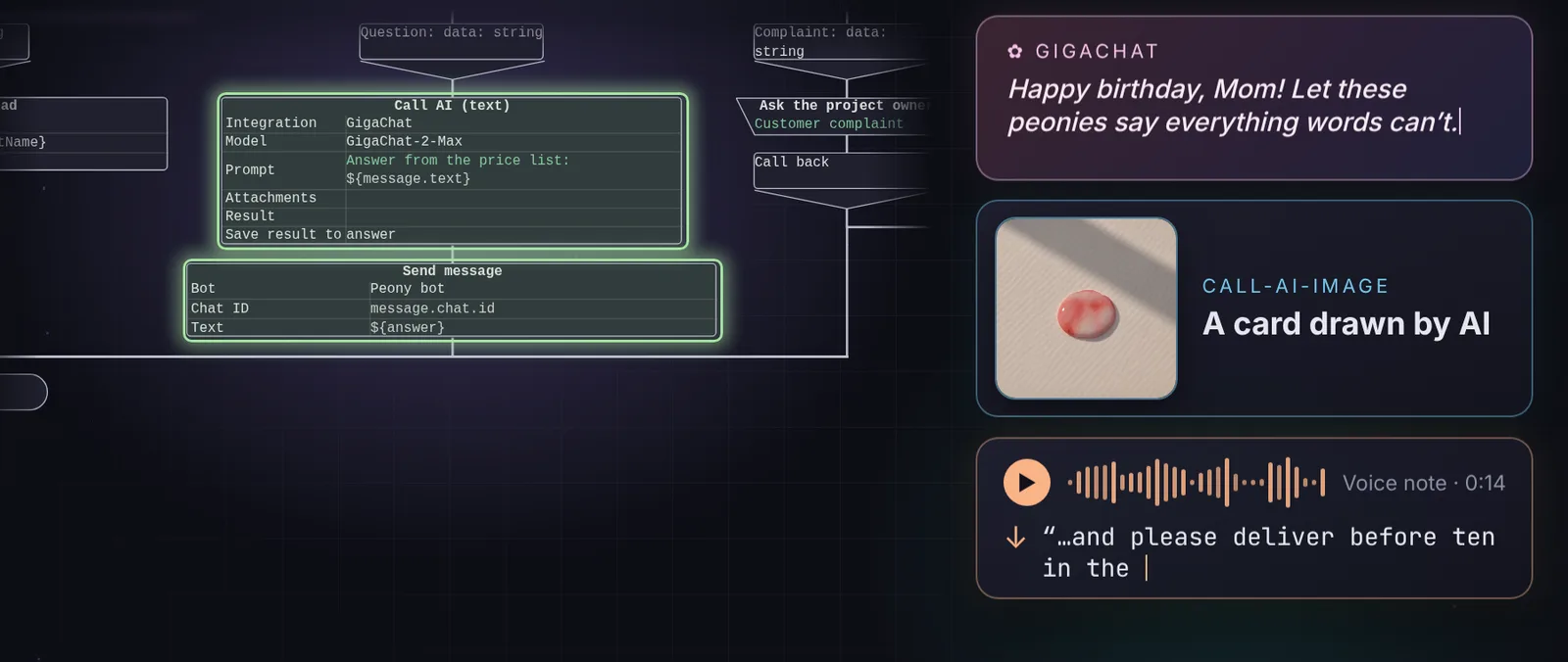
Calling a model is just a block: write a text, pick a branch by what a message means, draw an image or transcribe a voice note. OpenAI-compatible models, GigaChat and YandexGPT.

  • “AI choice” branches on the model’s answer
  • Image generation and speech recognition
  • Photos from Telegram go straight into the model’s attachments
AI call blocks in a diagram and their results: a card text, an image and a voice transcript

AI agent

Describe the process — the agent builds it

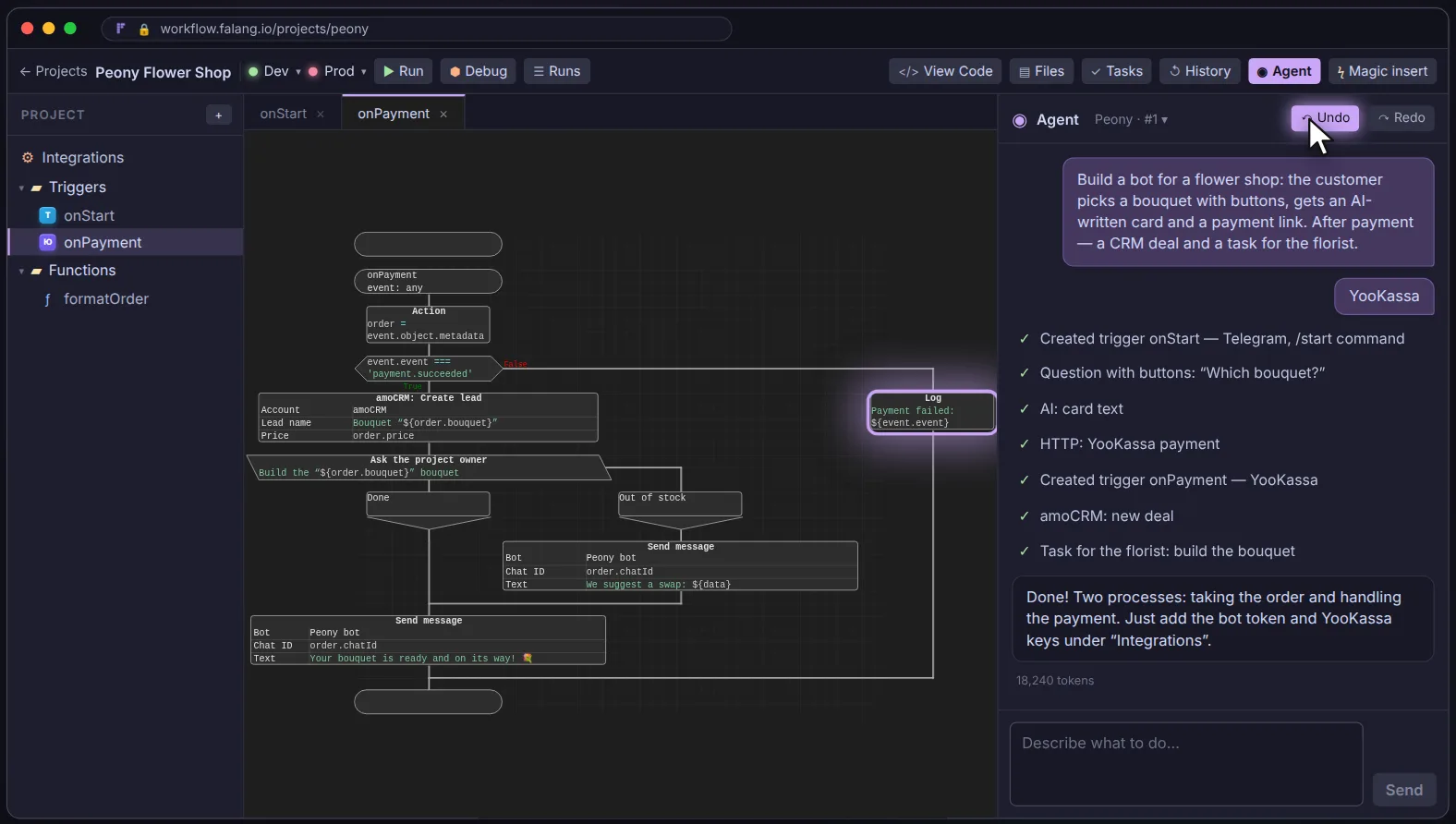
Tell the chat what you want automated. The agent asks clarifying questions, creates triggers and functions, wires up integrations and builds the diagrams in front of you.

  • Every step visible, any of them undoable
  • Credentials can be filled in later
  • “Don’t ask, just do it” when you don’t want questions
The AI agent panel listing completed steps next to the payment diagram it built

Magic node

A step written in plain words

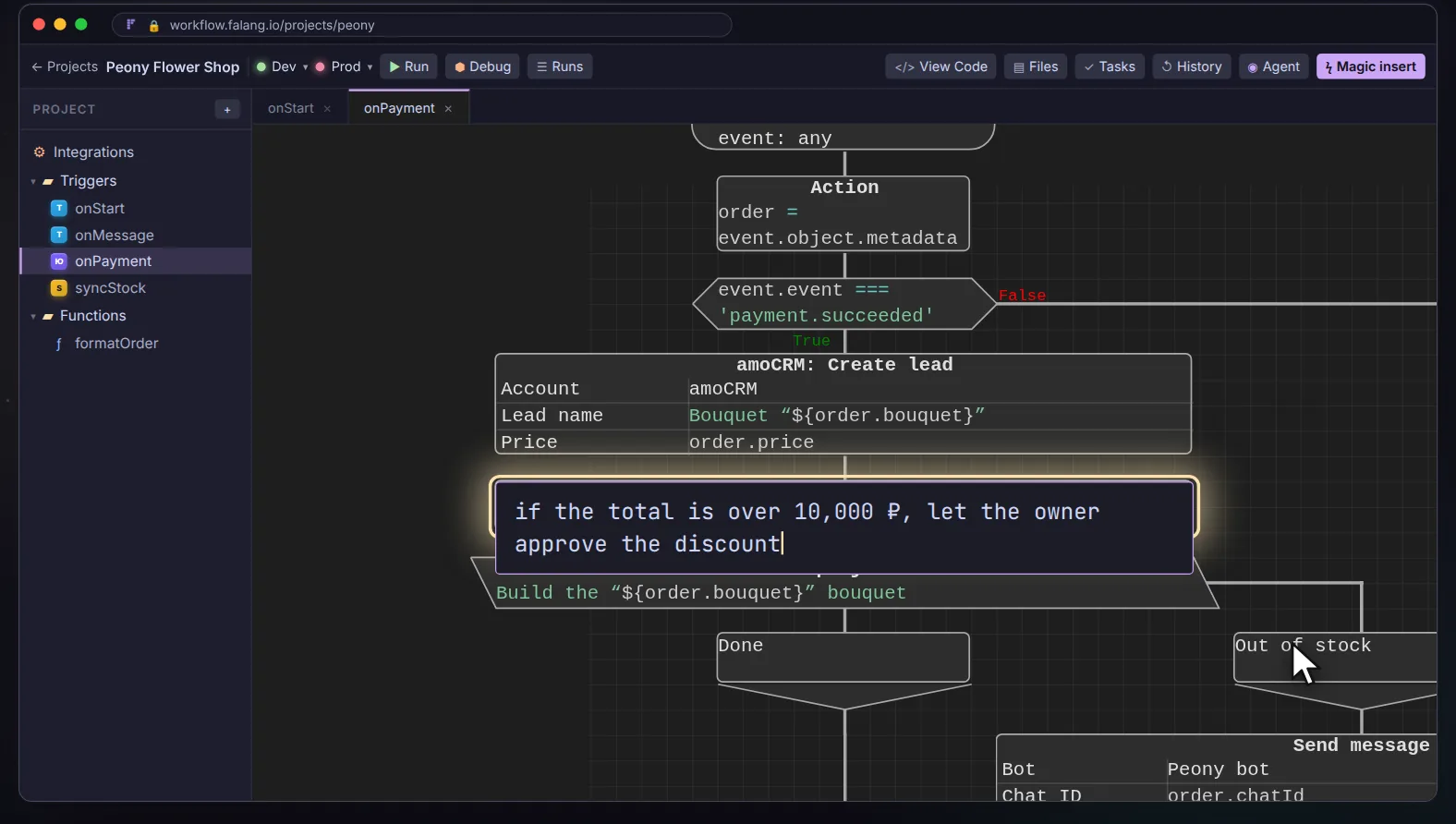
Click a line and write what the step should do. The agent builds real blocks underneath, while the canvas keeps your text — the diagram reads like a description of the task.

  • Runs as ordinary blocks, no AI at run time
  • Open, edit or unwrap it into the diagram
  • Flagged when the steps were edited by hand
A magic node reading “if the total is over 10,000 — let the owner approve the discount”

Human in the loop

Approvals without messengers

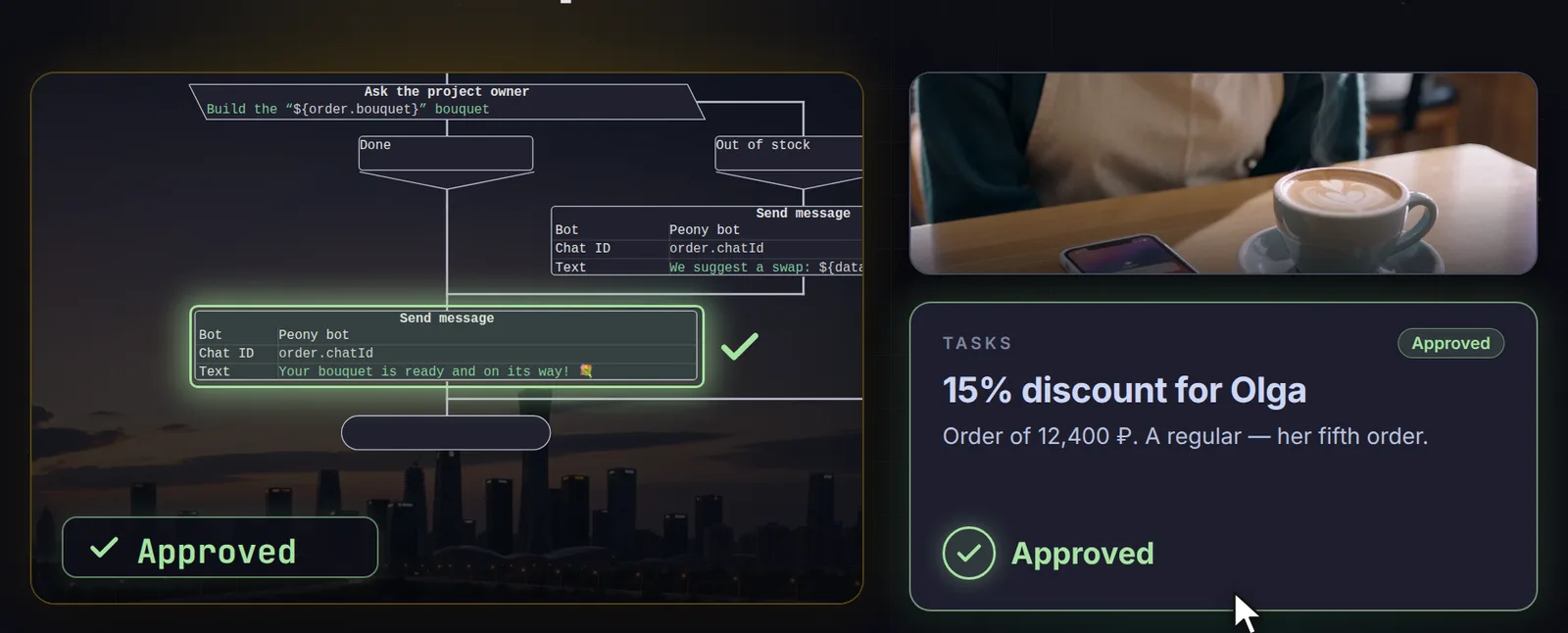
A “human task” block pauses the process until you decide — approve a discount, confirm a refund. The process will wait an hour, a day or a week, and won’t forget a thing.

  • Your own buttons with typed answers
  • A timeout branch
  • Telegram questions with buttons work the same way
The task “15% discount for Olga” approved, the process continuing down its branch

Debugging

See where the process is right now

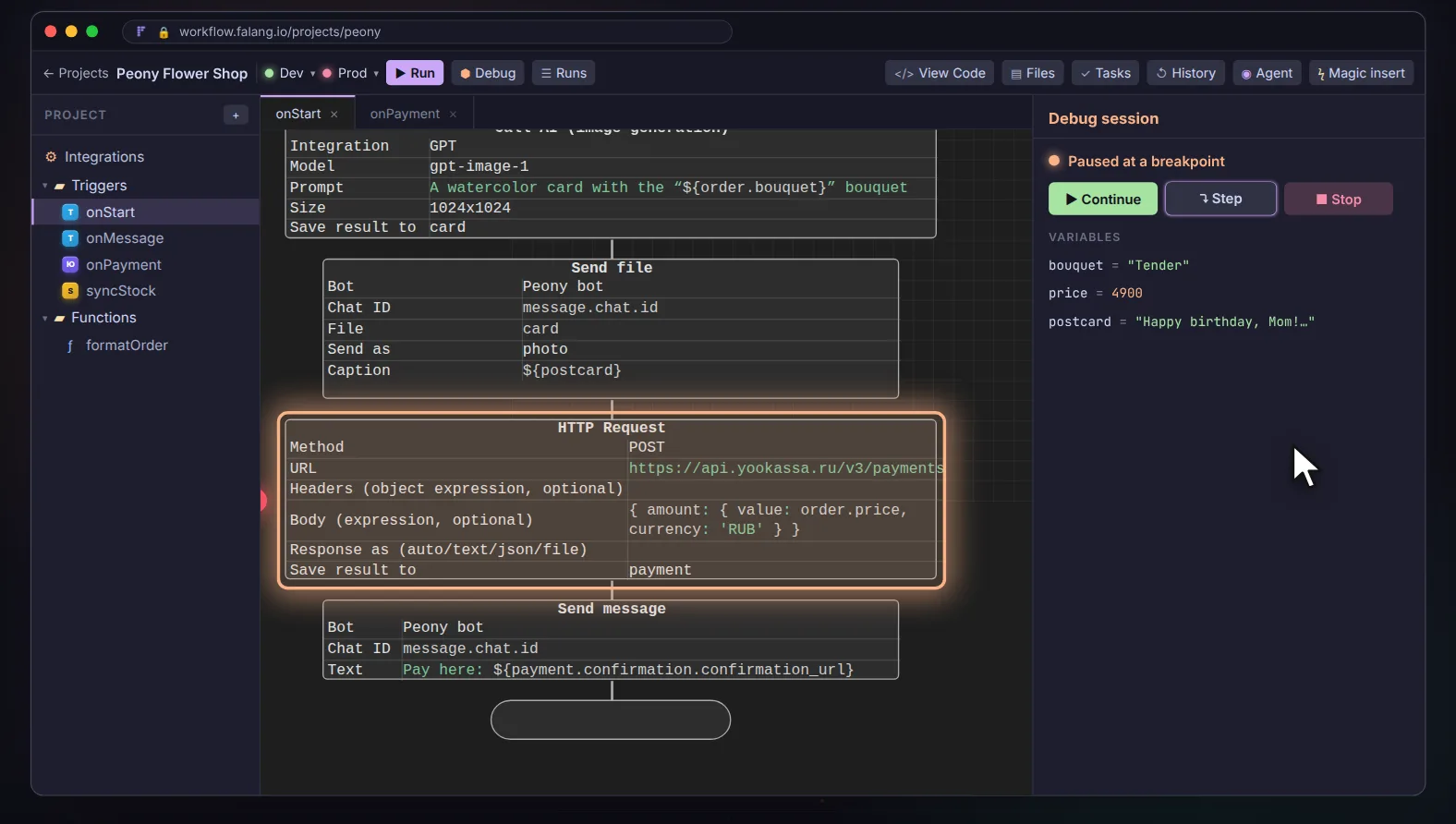
Run a function on the test stand and the current block lights up on the canvas. Set a breakpoint: execution pauses and the panel shows every variable in scope.

  • Continue, step over, stop
  • Fire a trigger with test data
  • An event history for every run
A debug session: the HTTP request block highlighted, variables on the right

Version history

Compare and roll back

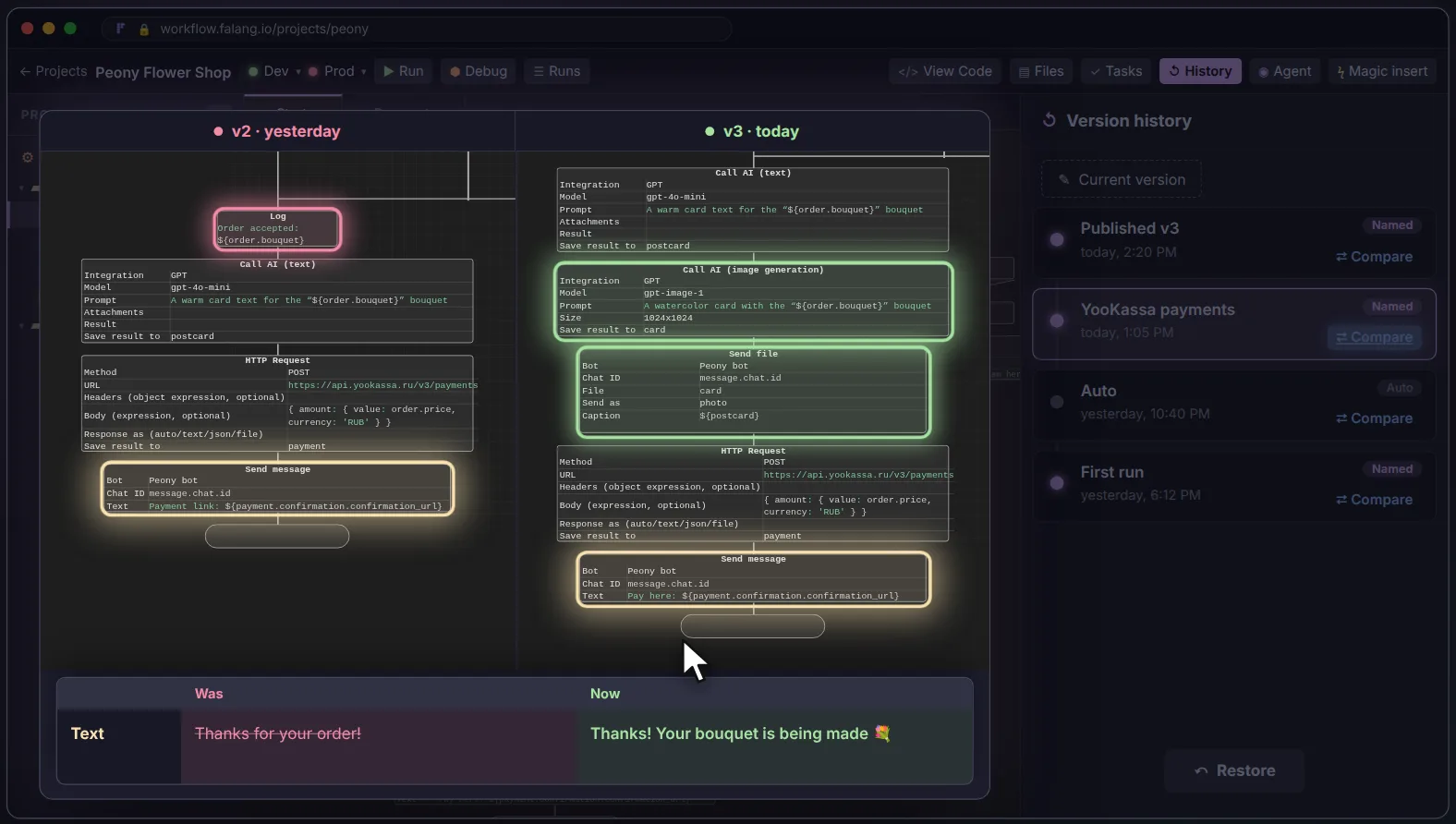
A project keeps its history like a Google Doc. Two versions open side by side, with added, removed and changed blocks highlighted right on the canvas.

  • Every publish is a named version
  • A restore can be undone too
  • Field-level diff of the selected block
Two versions of a diagram compared, with changed blocks highlighted

MCP

Claude Code joins the team

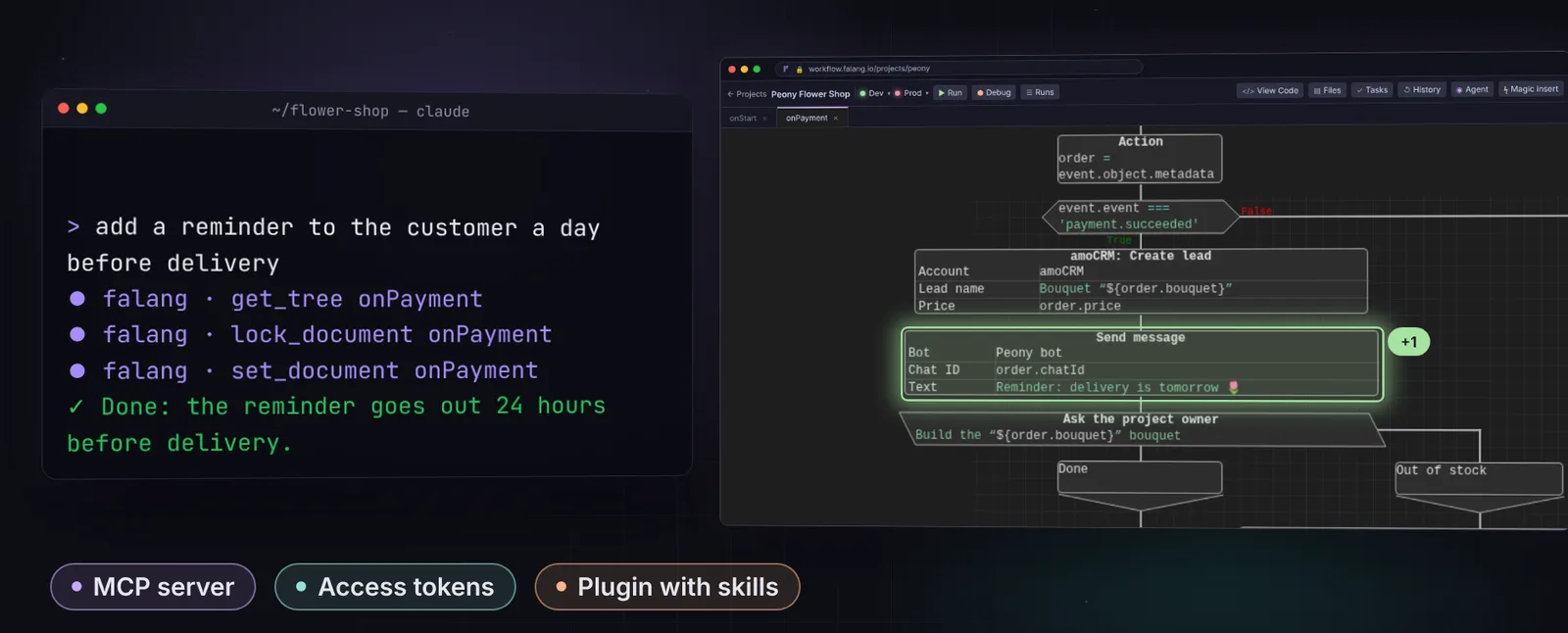
Connect Claude Code or another agent with a personal access token. It reads the project, edits diagrams, builds, runs and publishes — while the diagram it’s editing is locked in your browser.

  • A token can be limited to one project
  • Project exports never contain secrets
  • A Claude Code plugin with skills
Claude Code adding a reminder to a diagram in a terminal, the change visible in the editor

Use cases

What people automate with FalangFlow

  1. Telegram
  2. Payment
  3. CRM

A bot that takes payments

The bot asks which bouquet to make, AI writes the greeting card, the customer pays by link, a deal is created in the CRM and the florist gets a task.

  1. Schedule
  2. Marketplaces
  3. Warehouse

Marketplaces

Every 15 minutes, stock and orders are reconciled between marketplaces and the warehouse — no more manual spreadsheet exports.

  1. Webhook
  2. AI
  3. Task for a manager

Leads with AI

A model triages each website lead: hot ones go straight to a manager for approval, the rest go to a mailing list.

Deployment

In the cloud or on your own server

Falang Cloud

No installs, no servers: build processes right in the browser, with infrastructure and updates on us.

  • Coming soon
  • Idle processes use no resources
  • One-click publish to production

Your server

The same engine on your side: docker compose to start, Kubernetes for production. Your data never leaves your perimeter.

  • Open source under AGPL-3.0
  • Every process in its own pod
  • Users, roles and limits in the admin app

FalangFlow

And there’s more

Temporal durability

Retries on failure, timers that last weeks, and resuming from the same step after a server restart.

Databases

PostgreSQL and MySQL: “Sync structure” turns tables into types for select, insert, update and delete.

Files and media

Telegram photos, storage with public links, and ffmpeg: thumbnails, trimming, conversion.

Schedules

Intervals and cron with a visual builder — on durable Temporal Schedules.

HTTP and webhooks

Any API through an HTTP request block, any incoming request through a webhook.

Teams and admin

Users and roles, limits, platform OAuth apps and AI agent settings.

Secrets kept apart

Credentials are stored separately for test and production and encrypted before saving.

Integration proxy

Route selected integrations through a proxy in another region; everything else goes direct.

Project templates

Start from a ready-made process instead of a blank page.

FalangFlow

Who it’s for

Small businesses

A bot takes orders and payments, a deal lands in the CRM, a task goes to whoever fulfils it. No backend hire needed.

Online sellers

Stock and orders are reconciled between marketplaces and your warehouse on a schedule — no manual exports.

Developers and integrators

Temporal durability, strict TypeScript and self-hosting — without a heavyweight BPM rollout.

FalangFlow

FAQ

How is FalangFlow different from n8n or Zapier?

Diagrams read top to bottom instead of being a tangle of wires, fields are strictly typed TypeScript, and every process runs as a durable Temporal workflow: it survives crashes and can wait days for an event. And it’s open source.

Can I self-host it?

Yes. The engine is open source under AGPL-3.0 and starts with docker compose; every process runs in its own Kubernetes pod — exactly like in the cloud.

What happens if the server dies mid-process?

Temporal persists the state of every step, so after a restart the process continues from where it left off. Retries and timers work out of the box.

Which AI models are supported?

Any OpenAI-compatible one — OpenAI, Azure OpenAI, a local llama.cpp and more; processes can also use GigaChat and YandexGPT. The AI agent’s model is set by an administrator.

Where are secrets stored?

Credentials are encrypted and kept separately for the test stand and production; a project export never contains them.

Automate your first process

Self-host FalangFlow today — the source is open. The hosted version is coming soon.

Try online (soon)Source on GitHub